Wednesday, May 17, 2023
UCSDETECT
how to stop autocad selects solid surface automatically
UCSDETECT (System Variable)
Controls whether dynamic UCS acquisition is active when creating objects involving 3D planar surfaces.
Type: Integer
Saved in: Registry
Initial value: 1
You can align the UCS dynamically when your cursor hovers over a planar face on a 3D solid, a planar mesh element, or a planar point cloud segment while as you create an object.
Note: Dynamic UCS alignment does not detect planar surface objects or 2D geometry.
Value
Description
0
Not active
1
Active
Tip: If performance is an issue, you might want to set UCSDETECT to 0.

Thursday, September 1, 2022
TORIENT - Orients selected text objects to the most readable right-side-up, right-read orientation
Orients selected text objects to the most readable right-side-up, right-read orientation
TORIENT (Express Tool)

Rotates text, mtext, attribute definitions, and blocks with attributes for readability.
Find
Rotates text, mtext, and attribute definition objects so that they end up being as close as possible to horizontal or right-read (similar to the behavior of dimension text). Objects are rotated about their middle point in 180-degree increments. For example, if the text is upside-down, it becomes right-side up after a TORIENT operation. Similarly, left-read text becomes right-read text. The overall object location is not changed. As an option, you can specify a new absolute orientation angle for all selected text objects.
Tuesday, May 10, 2022
Tuesday, March 1, 2022


Sunday, September 22, 2019
layout tabs HIDDEN
Model and layout tabs are not showing in AutoCAD
By: 
Support
Jan 10 2019
Issue:
The model and layout tabs are missing in AutoCAD and do not show at the bottom of the program.Causes:
- The model and layout tabs have been turned off.
- Some versions of AutoCAD have the model and layout tabs toggled off by default.
- The tabs may be hidden behind the Windows Taskbar.
Solution:
Do one of the following to turn the model/layout tabs on:- On the command line in AutoCAD, type LAYOUTTAB and set the value to 1.
- Click the View tab on the ribbon and then under the Interface panel, click "Layout Tabs" to toggle the tabs on (blue indicates the feature is on).
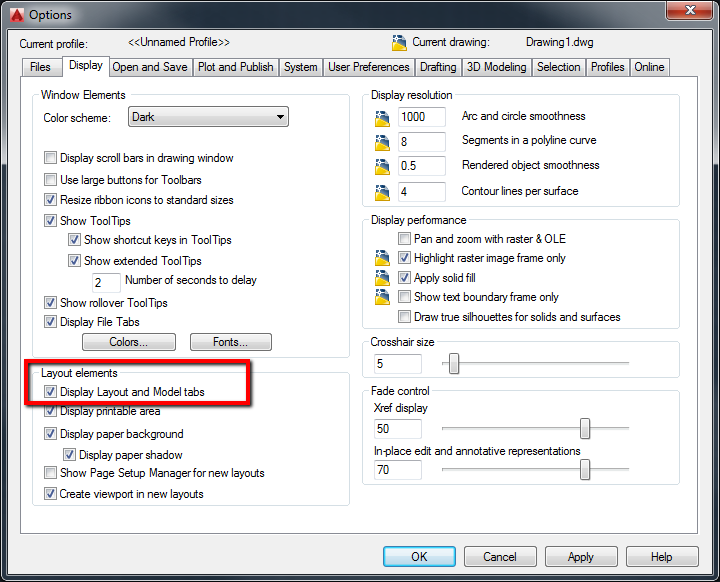
- Open the Options window by typing OPTIONS on the command line or clicking the Options button under the AutoCAD application menu at the top-left, click the Display tab, and then under the Layout elements section, enable the checkbox "Display Layout and Model tabs" and then click OK.
- If the "Display Layout and Model tabs" box is checked, the Windows Taskbar is probably hiding the bottom portion of the program. Reduce the size of the AutoCAD program window and move it up to show the full AutoCAD window.

Monday, June 18, 2018

Monday, March 19, 2018
Acad Xref Colour Reset
Use command : VISRETAIN
New value : 0
Note : Use this command in Model space
Save and reopen the drawing file.
Beware : Save the Layer State before exceting VISRETAIN to avoid missing your hard work.
To check the system variablem _.Sysvarmonitor

New value : 0
Note : Use this command in Model space
Save and reopen the drawing file.
Beware : Save the Layer State before exceting VISRETAIN to avoid missing your hard work.
To check the system variablem _.Sysvarmonitor

Subscribe to:
Comments (Atom)